Give the gift of a visit. Sold on your own website.
Sell experiences, set amounts and choose-your-own value gifts from your website. Payments go straight to your Stripe account, and your team redeems every voucher from the CMS.
Three ways to give
A voucher for every occasion.
Create vouchers for every occasion, from a spa day to a Sunday lunch. Your voucher shop is part of every Altius template, so it looks and feels like the rest of your website.
A set value
Sell a single experience or amount at a fixed price, such as afternoon tea for two or £50 to spend.
A choice of options
Let buyers pick the version that suits them, such as dinner for two or for four, each with its own price.
Their choice of amount
Let buyers decide how much to give, within the minimum and maximum you set.
Made for gifting
Gifts that arrive on the right day.
Buyers can send a voucher straight to the person it’s for, with a personal message and the date it should arrive. Perfect for birthdays, anniversaries and last-minute thank yous.
- 01
Choose a voucher.
Guests browse your vouchers on your website and add one or more to their basket.
- 02
Make it personal.
They add the recipient’s name and email address, a personal message and the day it should arrive.
- 03
Pay securely.
Checkout is handled by Stripe, and the payment goes straight to your account.
- 04
Delivered by email.
The buyer receives their voucher codes straight away. The recipient’s email arrives on the chosen day.
Secure payments
Your sales. Your Stripe account.
Connect your Stripe account from the Payments tab in your CMS. Voucher payments go straight to you, so we never hold your money.
Only the account owner or an admin can connect the account that voucher sales are paid into.
Paid into your account
Sales are paid into your own Stripe account the moment a customer pays.
Fees shown clearly
Any Altius platform fee is deducted at the point of sale and shown in your payment settings and sales exports.
Sale notifications
Choose an email address to hear about every new voucher sale.
Refunds kept in step
If a payment is fully refunded in Stripe, the voucher is cancelled automatically.
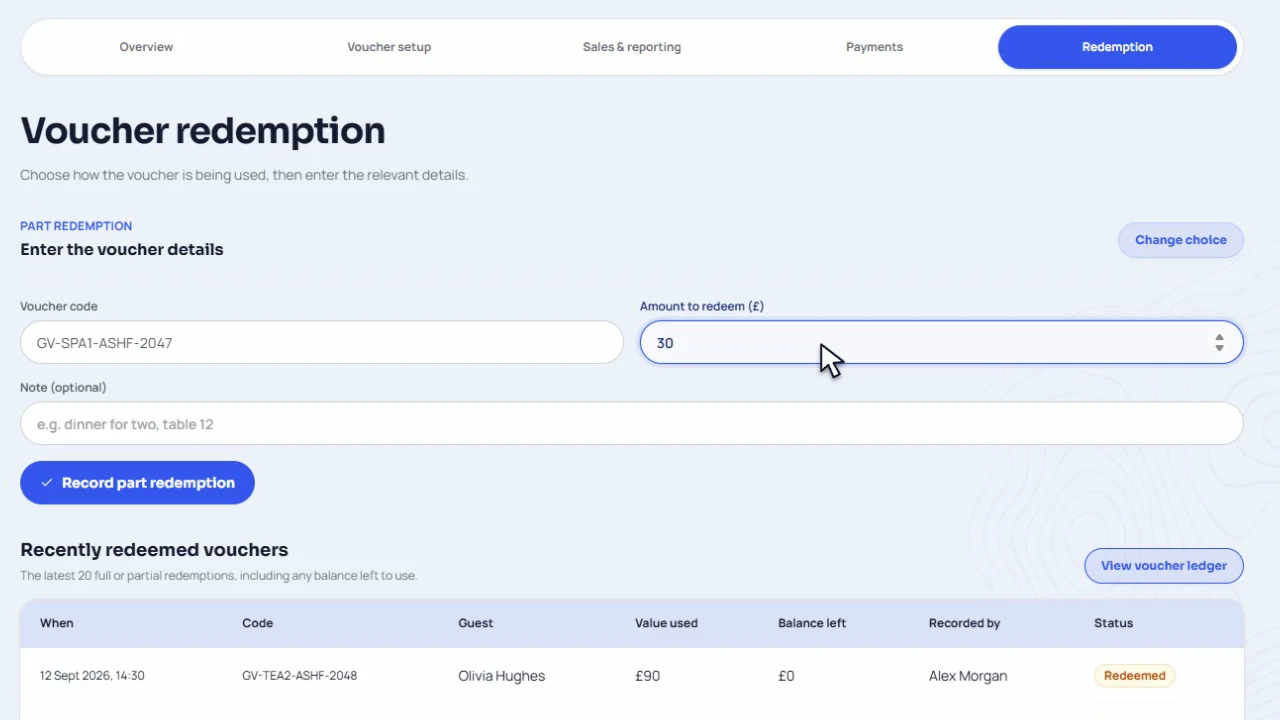
Redemption
Redeem in seconds, in full or in part.
Enter a voucher code in your CMS and record what’s been used. Any balance left stays on the voucher for next time.
- Redeem the full value or just part of it
- Find vouchers by code, buyer, recipient or order
- Add a note, such as the table or treatment
- See who recorded each redemption, and when
Everything in one place
Simple to run, day to day.
Set up your vouchers, follow your sales and keep your records tidy, all from the same CMS you use for your website.
Clear expiry rules
Set a default expiry for all your vouchers, then change it for individual vouchers, from 1 to 60 months. Expiry counts from the date of purchase.
Sales at a glance
See vouchers sold and redeemed, your average order and your best seller for the period you choose.
Exports for your accounts
Download paid orders, outstanding balances and redemption activity as CSV files.
Your terms, shown clearly
Add your voucher terms once. They appear on your website and in every voucher email.
Organised your way
Give each voucher its own image and description, and group vouchers into categories.
Sold vouchers stay valid
If you move to a plan without gift vouchers, the vouchers you’ve sold can still be redeemed until they’re used or expire.
Included with Summit
Start selling gift vouchers.
Gift vouchers are part of the Summit plan, alongside your website, CMS and the rest of your hospitality modules.
Compare plans